

Author: MailClickConvert Team
Last Updated: May 2026
Email automation sequences allow campaigns to run continuously without manual follow-ups. When built correctly, they guide contacts through a structured series of messages based on timing or subscriber behavior.
However, automation can quickly lose effectiveness when workflows are poorly designed. Messages may arrive too frequently, triggers may overlap, or contacts may receive emails that no longer match their level of engagement.
These issues are common in large bulk email programs where automation sequences grow over time without a clear structure. Understanding the most common mistakes can help teams design workflows that remain organized, relevant, and effective.
Starting with Overly Complex Workflows
One of the most common mistakes is building automation sequences that are too complicated from the start.
Many teams try to design detailed workflows with multiple branches, triggers, and conditions before understanding how their audience responds. While advanced automation can be powerful, complexity often makes workflows harder to manage.
Complicated workflows can create unexpected overlaps between sequences. Contacts may receive multiple emails from different workflows at the same time.
Starting with simpler sequences usually produces better results. Basic workflows can be expanded gradually as engagement patterns become clearer.
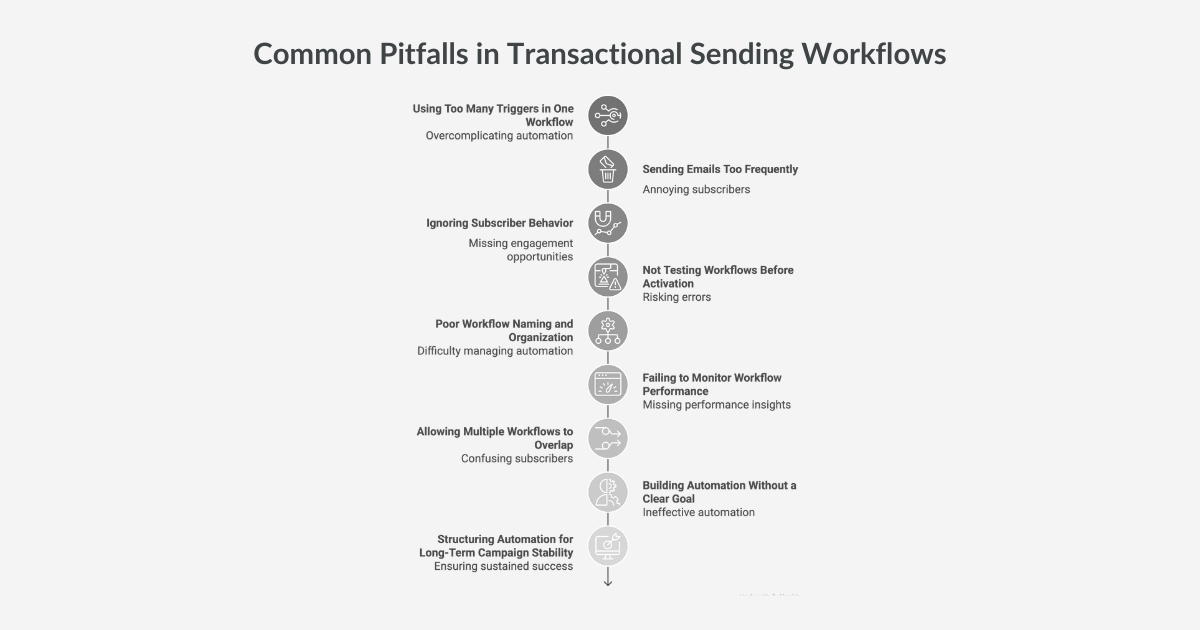
Using Too Many Triggers in One Workflow
Triggers are essential to automation, but using too many in a single sequence can create confusion.
For example, a workflow may start when a contact joins a list, then include additional triggers based on opens, clicks, and replies. If these triggers are not structured carefully, contacts may enter multiple paths at once.
This can lead to inconsistent messaging where subscribers receive emails that feel disconnected from their actions.
Effective workflows typically rely on a small number of clearly defined triggers. Each trigger should have a specific purpose within the sequence.
Sending Emails Too Frequently
Automation sequences often fail when messages are sent too close together.
When contacts receive several automated emails within a short period, engagement can decline. Frequent messaging may overwhelm recipients and reduce the likelihood that they read future emails.
Spacing messages appropriately helps maintain engagement. Time delays between steps allow recipients to absorb information before the next message arrives.
Testing different timing intervals can help identify the rhythm that works best for a campaign.
Ignoring Subscriber Behavior
Automation sequences work best when they respond to subscriber actions.
A common mistake is designing sequences that continue sending emails regardless of how recipients interact with previous messages. For example, contacts who already clicked a link may still receive introductory emails that no longer match their interest.
Workflows should adjust based on engagement signals such as opens, clicks, or replies. Responding to these actions helps ensure that messages remain relevant.
Behavior-based adjustments make automation sequences feel more natural.
👉 Learn more about engagement and deliverability: The Role of List Cleaning in Cold Email Success
Not Testing Workflows Before Activation
Automation systems often include multiple triggers, delays, and message steps. Without testing, small configuration errors can disrupt the sequence.
For example, a delay may be set incorrectly, causing messages to send too quickly or not at all. A trigger may activate the workflow under unintended conditions.
Testing workflows before activation helps verify that each step operates as expected. Running internal tests ensures the sequence functions correctly before contacts enter the automation.
Poor Workflow Naming and Organization
As automation grows, campaigns often accumulate many workflows.
If sequences are not clearly named or documented, it becomes difficult for teams to understand how each automation operates. This confusion can lead to overlapping workflows or duplicated communication.
Using descriptive workflow names makes it easier to identify the purpose of each automation. Adding short descriptions also helps teams understand how triggers and actions function within the sequence.
Organized workflows are easier to maintain and adjust over time.
Failing to Monitor Workflow Performance
Automation sequences should not remain unchanged once activated.
Subscriber behavior evolves as campaigns grow. A sequence that performed well initially may become less effective as the contact list expands.
Monitoring engagement metrics such as opens, clicks, and replies helps identify when adjustments are needed. Timing intervals, message content, or triggers may require refinement based on performance data.
Regular monitoring ensures automation sequences continue supporting campaign goals.
👉 Learn more about deliverability infrastructure: What Is an SMTP Relay and Why It Matters for Email Sending
Allowing Multiple Workflows to Overlap
In large campaigns, contacts may qualify for several automation sequences simultaneously.
If workflows are not coordinated, subscribers may receive emails from multiple sequences at the same time. This overlap can create confusion and reduce engagement.
Managing automation entry rules helps prevent this issue. Contacts should move between workflows in a structured way rather than triggering several sequences at once.
Clear workflow boundaries help maintain consistent communication.
👉 Related infrastructure guide: Choosing an SMTP Relay Provider: What to Look For
Building Automation Without a Clear Goal
Automation sequences are most effective when they support a specific objective.
Some workflows are designed to introduce new contacts to a campaign. Others guide engaged subscribers toward deeper interaction or provide additional information.
Without a defined goal, automation sequences may send messages that feel disconnected from the campaign strategy.
Each workflow should serve a clear purpose within the broader email program.
Structuring Automation for Long-Term Campaign Stability
Automation can transform how bulk email campaigns operate. When workflows are structured carefully, campaigns become easier to manage and more responsive to subscriber behavior.
Avoiding common mistakes such as excessive complexity, overlapping triggers, and poor timing helps ensure automation remains effective as campaigns grow.
Simple, well-organized workflows often outperform complicated sequences that are difficult to manage.
As contact lists expand, automation provides the structure needed to maintain consistent communication.
👉 Learn more about SMTP infrastructure for large campaigns: Dedicated SMTP vs Shared SMTP for Bulk Mailing: Affiliate Marketer’s Guide
Run Bulk Email Campaigns with Automated Workflows
As email campaigns grow, manually managing every follow-up becomes harder. Contacts open, click, and reply at different times, and slow responses can weaken engagement.
MailClickConvert provides workflow automation tools built to support large bulk email programs.
With MailClickConvert, you get:
• Email workflow automation triggered by subscriber actions
• Trigger types for list additions, campaign opens, clicks, and replies
• Structured campaign management for large contact lists
• Deliverability monitoring and reputation insights
Instead of sending every follow-up manually, MailClickConvert helps your campaigns respond automatically as contacts interact with your emails.
If your campaigns are expanding and you need a better way to manage engagement, explore MailClickConvert and see how workflow automation supports large-scale email programs.
- Log in to post comments