

Author: MailClickConvert Team
Last Updated: February 24, 2026
Most teams start with a single SMTP relay and sending at lower volume campaigns, works for them without any obvious issues. However, over time, as campaigns expand and more traffic comes through the same path, delivery patterns begin to change. Delays happen more frequently and some campaigns affect others.
The issue is rarely isn’t from copy alone. It is often because of their infrastructure.
A multi-SMTP setup is used to make deliverability better, it distributes sending across separate relay paths so that no single connection carries all the load. When configured properly, this reduces delivery pressure, protects domain reputation, and keeps high-volume sending effective.
This guide explains what a multi-SMTP setup is, when it becomes necessary, and how to structure it without introducing new risks.
What Is a Multi-SMTP Setup?
A multi-SMTP setup simply means using more than one SMTP relay or sending path to distribute outbound email traffic. Instead of sending transactional email, newsletters, and email outreach through the same connection, traffic is separated logically across different relay configurations.
This separation is not about bypassing filters or increasing raw sending capacity. It is about controlling how different types of email influence each other. When all traffic flows through one path, performance issues in one category can affect everything else. With multiple relays, each stream can be managed independently.
Multi-SMTP setups often differ by domain, subdomain, IP address, or email purpose. The structure depends on sending volume and campaign complexity, but the principle remains the same: isolate risk and maintain control.
Understand how SMTP relays work in email sending:
👉 What Is an SMTP Relay and Why It Matters for Email Sending
When Do You Need a Multi-SMTP Setup?
Not every sender needs multiple relays immediately. At lower volumes with consistent patterns, a single well-managed SMTP path can perform reliably.
A multi-SMTP structure becomes more relevant only when:
- daily sending volume increases significantly
- transactional and marketing email are sent together
- email outreach campaigns run alongside product notifications
- delivery becomes inconsistent during campaign launches
- multiple brands or domains are managed under one infrastructure
As sending volume grows, mixing traffic types increases the chance that engagement shifts or campaign spikes influence your entire sending reputation.
Step-by-Step: How to Build a Multi-SMTP Setup
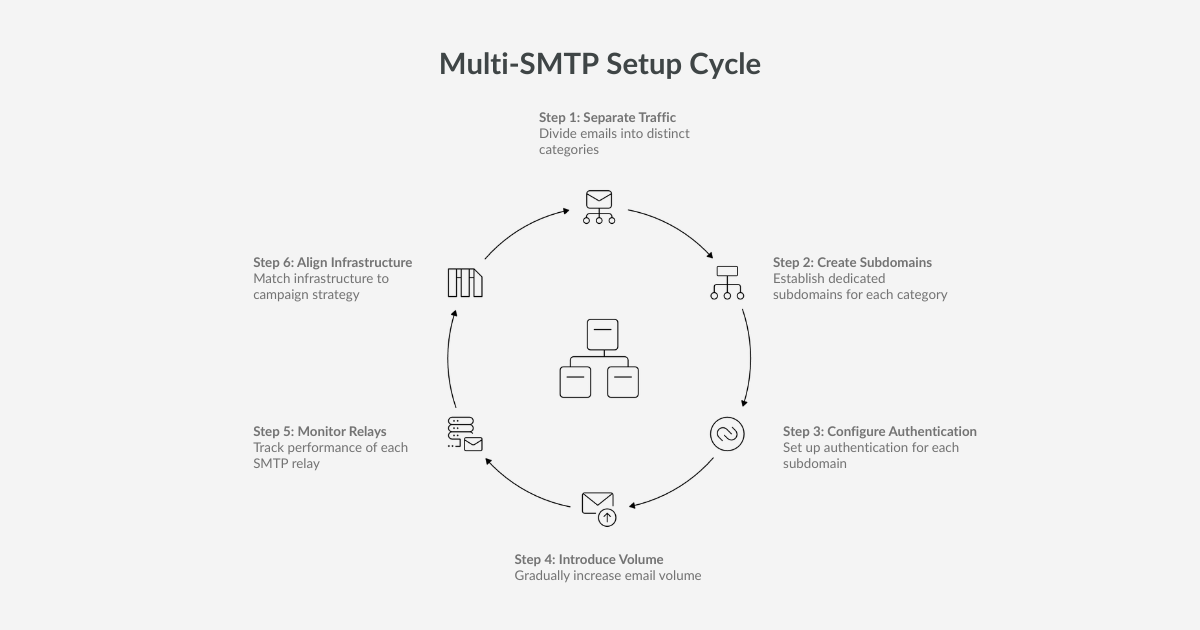
This is where most teams overcomplicate things. A strong multi-SMTP structure is built gradually and deliberately.
Step 1: Separate Traffic by Purpose
Start by listing what you send and what should never be affected by other traffic. Most teams end up with 2–3 sending streams, usually:
- transactional (password resets, invoices, account alerts)
- marketing (newsletters, announcements, promotions)
- email outreach (prospecting and outbound campaigns)
The goal in this step is not configuration yet. It is deciding what deserves its own lane, especially once volume increases.
Each category behaves differently in terms of engagement and provider scrutiny.
Understand the difference between marketing and transactional SMTP:
👉 SMTP Relays for Marketing vs Transactional Email
Step 2: Create Dedicated Sending Subdomains
Instead of sending everything from your primary domain, create dedicated subdomains such as:
Once you know your streams, choose the separation method that fits your setup. In most cases, the cleanest approach is dedicated sending subdomains, but you may also separate by SMTP relay, IP, or a combination.
A common structure looks like:
- transactional.yourdomain.com
- outreach.yourdomain.com
- marketing.yourdomain.com
This separation helps each stream build its own reputation and reduces the chance that changes in one stream affect another.
How this works at the DNS level:
👉 Cloudflare explains how email subdomains and DNS separation function
Step 3: Configure Authentication Correctly
Each SMTP path should have proper authentication configured independently. This includes:
- SPF alignment
- DKIM signing
- DMARC policy consistency
Authentication must match the sending subdomain. Misalignment here can create more damage than a single-relay setup.
Take your time with this step. Infrastructure stability depends on it.
Understand how SPF, DKIM, and DMARC work together:
👉 Email Sender Guidelines
Step 4: Introduce Volume Gradually
Do not activate a new relay and immediately push full campaign volume through it. Inbox providers monitor new sending sources closely.
Increase traffic gradually. Keep daily sending consistent. Avoid large spikes during the first weeks of activation.
Multi-SMTP only works if each path develops its own stable history.
See what to look for when choosing an SMTP provider:
👉 Choosing an SMTP Relay Provider: What to Look For
Step 5: Monitor Each Relay Independently
Once live, treat each SMTP path as its own environment.
Watch:
- bounce rates
- delivery delays
- deferrals
- engagement changes
If one stream weakens, you can adjust it without affecting others. That isolation is the main benefit of multi-SMTP.
Step 6: Align Infrastructure With Campaign Strategy
Your infrastructure should mirror how your campaigns operate.
High-risk outreach campaigns should not share sending paths with system notifications. Large announcements should not sit on the same relay as sensitive transactional flows.
When structure aligns with campaign type, delivery behavior becomes easier to predict.
The Core Principle: Separate by Email Purpose
The most important distinction in email infrastructure is between transactional and marketing traffic.
Transactional messages are triggered by user actions such as password resets, order confirmations, invoices, and account alerts. These emails are expected and time-sensitive, and they generally receive strong engagement.
Marketing and outreach emails operate differently. Newsletters, promotional campaigns, onboarding sequences, and email outreach are evaluated more aggressively by inbox providers because recipients did not necessarily request them at that moment.
When both types of traffic share the same SMTP path, fluctuations in marketing engagement can affect transactional delivery. Separating these streams reduces that risk and protects critical messages from performance shifts elsewhere.
Common Multi-SMTP Mistakes
Multi-SMTP setups can create problems if implemented without structure. Common mistakes include rotating relays randomly, sending identical campaigns from multiple IPs at the same time, ignoring authentication alignment, or increasing volume too quickly on new paths.
Multi-SMTP is not a shortcut for avoiding deliverability rules. It works only when combined with disciplined sending patterns and careful volume management.
How Multi-SMTP Supports Bulk Email Deliverability
Bulk emailing is particularly sensitive to sending behavior because engagement varies widely across recipients. Some contacts reply quickly, others ignore the message, and inbox providers factor that variation into how they evaluate the sender.
A structured multi-SMTP setup helps by isolating outreach traffic, keeping sending patterns predictable, and preventing campaign spikes from affecting other email types. When infrastructure absorbs engagement variation instead of amplifying it, bulk email becomes more stable.
This reinforces a core principle: email performance depends more on delivery behavior than on message structure.
How MailClickConvert Handles Multi-SMTP Infrastructure
MailClickConvert allows you to connect and manage multiple SMTP relays within the same platform, giving you flexibility in how traffic is distributed and controlled. Instead of routing everything through one connection, you can assign relays according to purpose and distribute traffic intentionally.
Inside the platform, you can:
- use separate SMTPs for transactional, outreach, or newsletter traffic
- rotate multiple SMTPs within a single campaign to distribute volume
- monitor performance for each SMTP path independently
- apply bounce suppression before sending to reduce risk
Multi-SMTP works when sending decisions are deliberate, volume changes are gradual, and each path is monitored consistently. MailClickConvert supports that structure, but predictable delivery depends on how you use it.
Final Thoughts
A multi-SMTP setup is not about sending more email. It is about structuring delivery in a way that protects your reputation as volume increases and campaign complexity grows.
When all traffic flows through one path, risk concentrates. When traffic is separated logically and monitored carefully, delivery becomes more predictable. Bulk email performs best when infrastructure supports consistency rather than reacting after problems appear.
If your sending volume is increasing or your campaigns are becoming more complex, reviewing your SMTP structure early is far easier than repairing reputation later.
Try MailClickConvert to manage multi-SMTP sending with controlled pacing, protected reputation, and infrastructure designed for consistent bulk email delivery.
- Log in to post comments