

Author: MailClickConvert Team
Last Updated: April 2026
Bulk email campaigns often focus on sending messages to large contact lists. A campaign goes out, results come in, and the team evaluates opens, clicks, or replies afterward. This approach works for simple outreach, but it quickly becomes inefficient as campaigns grow.
Every contact behaves differently. Some open emails immediately. Others click links but never respond. Some reply with questions, while others join a list but never engage again. Treating all contacts the same ignores these signals.
Email workflow automation solves this problem by turning those signals into actions. Instead of sending one message to everyone, workflows automatically respond to subscriber behavior and move contacts through structured communication paths.
When campaigns use workflow automation, messages become more timely, more relevant, and easier to manage at scale.
What Email Workflow Automation Means
Email workflow automation is a system that sends emails automatically based on specific triggers or timing rules. Instead of manually sending every message, the platform reacts to contact activity.
For example, when someone joins a list, opens an email, clicks a link, or sends a reply, the system can trigger a new action automatically.
This allows email campaigns to behave more like guided journeys rather than one-time messages. Contacts move through a sequence of interactions based on their engagement.
Automation removes the need for manual follow-up while ensuring that contacts receive the right message at the right moment.
👉 Learn more about how timing and structured follow-ups improve campaigns: How Many Follow-Ups Should You Send?
How Email Workflows Operate
An email workflow begins with a trigger. The trigger tells the system when the automation should start.
Once the trigger occurs, the workflow performs the next step. That step may involve sending a follow-up email, moving the contact into another sequence, or waiting for a time delay before continuing.
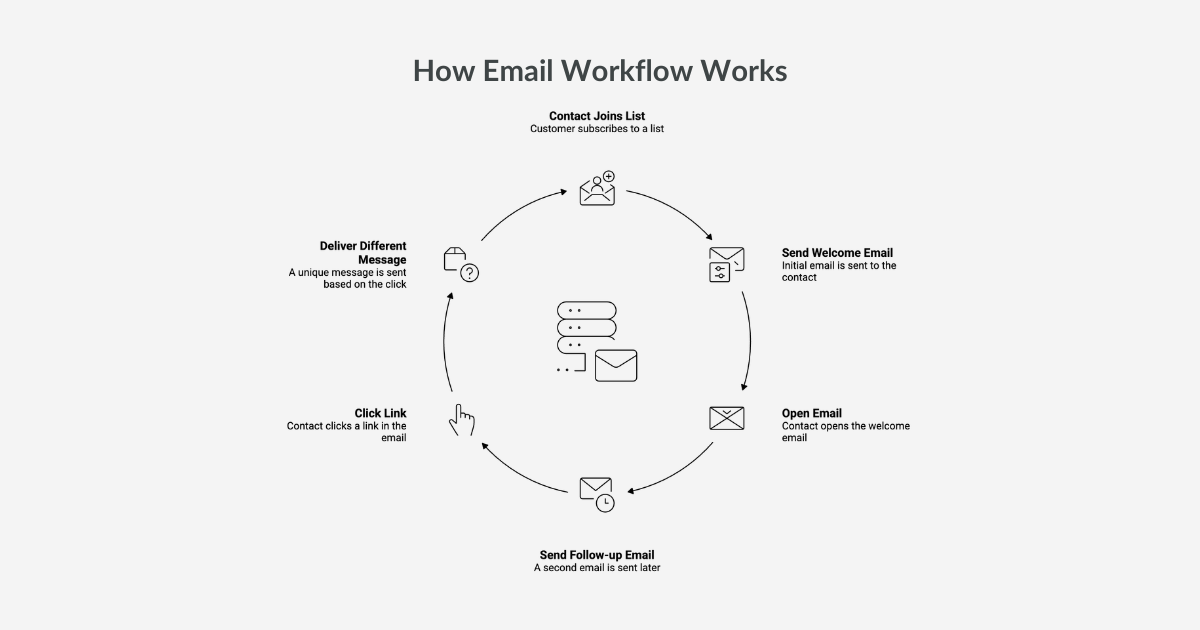
A simple workflow might look like this:
- A contact joins a list
- The system sends a welcome email
- If the contact opens the message, a follow-up email is sent later
- If the contact clicks a link, a different message is delivered
Instead of manually managing these responses, the system performs them automatically.
Common Trigger Types Used in Email Workflows
Most email workflow systems rely on a small set of triggers that activate automated actions. These triggers represent common engagement signals from subscribers.
List Addition
This trigger activates when a contact is added to a specific list.
It is commonly used for welcome sequences, onboarding messages, or introductory campaigns. When a new contact joins a list, the system can immediately begin a predefined email sequence.
List-based triggers are often the starting point for automated customer journeys.
Campaign Open
This trigger runs when a recipient opens a campaign email.
Open behavior signals that the recipient has shown interest in the message. Workflows can use this signal to send follow-up emails, provide additional information, or continue the communication sequence.
Campaign open triggers help campaigns respond to early engagement.
Campaign Click
This trigger activates when someone clicks a link inside an email.
Click activity usually indicates a stronger interest than an open. When a contact clicks a link, the workflow can deliver more targeted information related to the topic they selected.
Click-based workflows often guide contacts toward product pages, resources, or deeper campaign content.
Email Received
This trigger runs when a reply email is received.
Replies signal direct engagement and often require a different type of response. Workflows triggered by replies can notify a team member, move the contact into another segment, or trigger follow-up communication.
Reply-based triggers help campaigns respond quickly to active conversations.
Creating a Workflow Step by Step
Setting up a workflow usually involves a few simple steps.
First, create a workflow name. The name should clearly describe the purpose of the automation so it is easy to identify later.
Next, add a short description explaining what the workflow is designed to do. Descriptions help teams understand how workflows operate when managing multiple automations.
After naming the workflow, choose the trigger type. This determines when the workflow begins. The system will monitor the selected event and activate the workflow when the condition is met.
Once the trigger is selected, you can define the list or contact group associated with the workflow. This ensures that only the intended contacts activate the automation.
From there, additional actions such as sending emails or adding time delays can be configured.
Why Workflow Automation Improves Bulk Email Campaigns
Bulk email campaigns become more effective when communication responds to behavior.
Without automation, every contact receives the same message sequence regardless of how they interact with previous emails. This can create irrelevant communication or missed opportunities.
Workflow automation allows campaigns to adapt.
Contacts who engage with messages can receive additional information. Contacts who do not engage may receive reminders or different content. Contacts who reply can be moved into more direct conversations.
This behavioral structure creates more meaningful communication without increasing manual workload.
👉 For better engagement results, clean data also plays a role. Read more: How Often Should You Clean Your Email List?
Best Practices for Building Email Workflows
Automation works best when workflows are clear and manageable. Overly complex workflows can become difficult to maintain.
A few practical guidelines help keep workflows effective.
Use descriptive workflow names so teams can easily identify each automation.
Start with simple workflows. Basic automation sequences are easier to manage and can be expanded later as campaigns grow.
Test workflows before activating them. Sending test messages ensures that triggers, delays, and message sequences behave as expected.
Monitor workflow performance regularly. Engagement patterns can reveal when timing adjustments or message changes are needed.
Automation improves over time when workflows are reviewed and refined.
👉 Deliverability also impacts workflow success. Learn more: How to Improve Email Deliverability at Scale
Scaling Email Campaigns with Automation
As email campaigns expand, manual management becomes increasingly difficult. Larger contact lists generate more engagement signals, which makes it harder to respond to each one individually.
Workflow automation helps solve this challenge.
Instead of manually tracking opens, clicks, and replies, the system handles those signals automatically. Contacts move through predefined communication paths while teams focus on improving messaging and strategy.
Automation allows campaigns to grow without increasing operational complexity.
👉 Infrastructure becomes critical at scale. Learn more about sending systems: Bulk Email Marketing
Manage Bulk Email Campaigns with Automated Workflows
As email campaigns expand, managing contact behavior manually becomes difficult. Workflow automation helps structure communication, so contacts receive messages based on their actions rather than a fixed schedule.
MailClickConvert provides tools designed to support bulk email programs while keeping communication structured and manageable.
With MailClickConvert, you get:
- Email workflow automation that responds to subscriber activity
- Multiple trigger types, including list addition, campaign opens, clicks, and replies
- Structured campaign management for large contact lists
- Deliverability monitoring and reputation insights
Instead of managing every follow-up manually, MailClickConvert allows your campaigns to react automatically to subscriber behavior.
If your campaigns are growing and you need a more structured way to manage engagement, explore MailClickConvert and see how workflow automation improves bulk email performance.
- Log in to post comments