

Author: MailClickConvert Team
Last Updated: May 22, 2026
Most bulk email campaigns begin manually.
A team uploads a contact list, sends a campaign, checks results, and follows up later if engagement looks promising. At smaller volumes, this process feels manageable. A few campaigns per week can be monitored manually without much difficulty.
As campaigns grow, that structure starts to break down.
Contacts open emails at different times. Some click links immediately while others reply days later. Lists expand. Follow-ups become harder to track. Eventually, campaign management turns into a constant cycle of checking engagement, scheduling replies, and trying to keep communication organized.
This is where the difference between manual and automated campaign management becomes important.
Both approaches can send emails successfully. The difference is how they handle timing, engagement, consistency, and operational scale.
👉 Related read: Common Mistakes When Building Email Automation Sequences
What Manual Campaign Management Looks Like
Manual campaign management relies on human oversight for most campaign activity.
A team typically creates a campaign, sends it to a contact list, and reviews engagement afterward. Follow-ups are often scheduled manually based on opens, clicks, or replies.
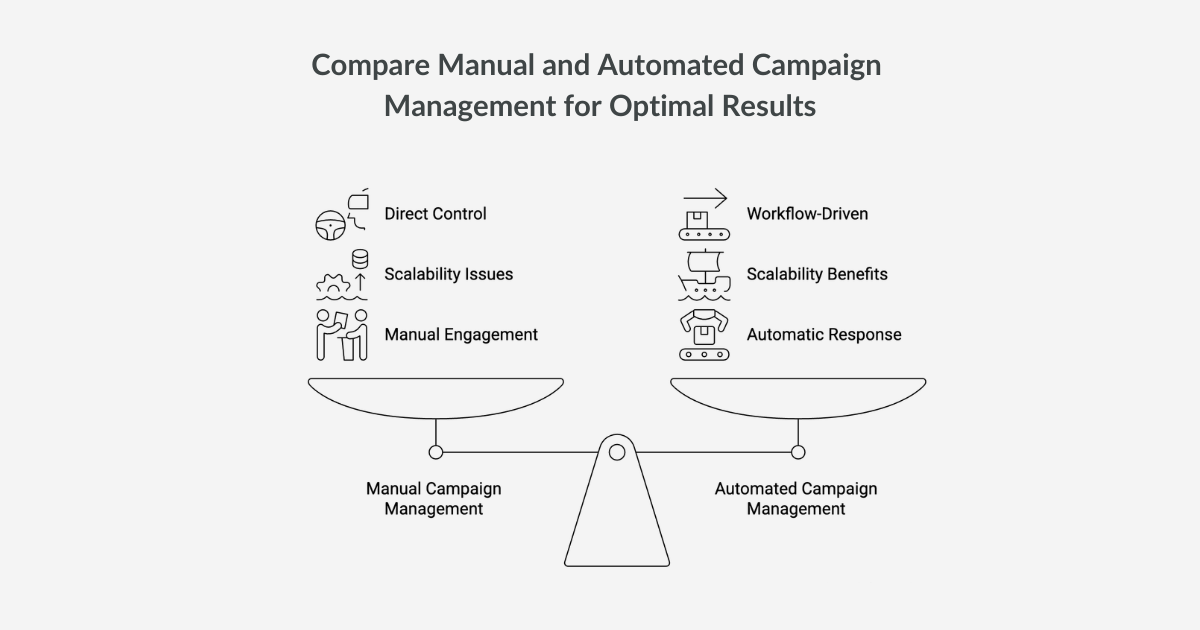
This approach gives teams direct control over communication timing and message adjustments. For smaller campaigns, that flexibility can work well.
However, manual management becomes difficult as activity increases.
Large contact lists generate constant engagement signals. Contacts may open emails at different times, click links hours later, or reply while another campaign is already running. Tracking these interactions manually becomes increasingly complex.
The more campaigns operating simultaneously, the harder it becomes to maintain consistent communication.
What Automated Campaign Management Does
Automated campaign management uses workflows and triggers to respond to subscriber behavior automatically.
Instead of waiting for a team member to review engagement manually, the system reacts when specific actions occur.
For example:
- a contact joins a list
- a campaign email is opened
- a link is clicked
- a reply is received
These events can automatically trigger follow-up emails, delays, list updates, or additional workflow actions.
Automation turns campaigns into structured communication systems rather than isolated email sends.
Instead of manually monitoring every interaction, the platform manages responses based on predefined rules.
The Biggest Difference Is Timing
One of the main differences between manual and automated management is response timing.
Manual campaigns depend on when a team notices engagement. A contact may click a link in the morning but not receive a follow-up until much later.
Automation removes that delay.
When workflows are active, follow-ups can occur immediately after engagement signals appear. Contacts receive messages while interest is still active instead of waiting for manual review.
This timing advantage becomes more important as campaign size increases.
Large campaigns generate too many interactions for teams to manage individually at consistent speed.
Manual Campaigns Become Harder to Scale
Manual management often works well at low volume because activity remains manageable.
As campaigns grow, several operational problems appear:
- follow-ups become inconsistent
- engagement signals are missed
- contacts receive delayed responses
- campaign organization becomes harder to maintain
Managing multiple campaigns manually also increases the chance of overlap. A contact may receive duplicate communication or messages that no longer match their engagement level.
Automation helps reduce these operational gaps by organizing campaign behavior into workflows.
👉 Learn more about scaling infrastructure: How SMTP Relay Rotation Works with Multi-SMTP Relays for Email Sending
Automation Creates Structured Campaign Paths
Automated workflows allow contacts to move through campaigns based on behavior.
For example, one subscriber may open a campaign but never click a link. Another may click immediately and request more information. Automation sequences can respond differently to each person without requiring manual intervention.
This structure creates more organized communication paths.
Instead of sending identical follow-ups to every contact, workflows adapt based on engagement signals.
The result is a campaign system that behaves more dynamically while remaining manageable at scale.
👉 Related read on workflow automation: What Is Email Workflow Automation and Why Your Campaigns Need It
Manual Management Still Has a Role
Automation does not completely replace manual oversight.
Campaign strategy, segmentation decisions, message quality, and performance analysis still require human involvement. Automation handles repetitive operational tasks, but teams still guide the overall direction of the campaign.
Manual review also remains important for conversations that require personalized responses or decision-making beyond workflow logic.
The most effective systems usually combine both approaches:
- automation manages repetitive workflow activity
- teams focus on strategy and communication quality
This balance allows campaigns to scale without losing operational control.
Why Automation Improves Consistency
Consistency becomes harder to maintain when campaigns rely entirely on manual management.
Different team members may schedule follow-ups differently. Delays between responses can vary. Engagement tracking may become inconsistent across campaigns.
Automation standardizes these processes.
Workflows respond according to predefined rules, ensuring that contacts move through campaigns in a consistent way. This structure becomes especially important in large bulk email programs where multiple campaigns operate simultaneously.
Consistent communication often produces more stable engagement patterns over time.
👉 Related deliverability guide: The Role of List Cleaning in Cold Email Success
Choosing the Right Approach for Your Campaigns
The right approach depends on campaign size and operational complexity.
Smaller campaigns with limited contact lists may function effectively with manual management. Teams can monitor engagement directly and respond without difficulty.
As campaign volume increases, automation becomes more valuable.
Larger email programs generate too much activity for manual oversight alone. Workflows help organize that activity, respond to engagement quickly, and maintain consistency across campaigns.
The goal is not replacing human involvement entirely. It is reducing the operational workload that limits scalability.
👉 Learn more about deliverability infrastructure: What Is an SMTP Relay and Why It Matters for Email Sending
Run Bulk Email Campaigns with Automated Workflows
As email campaigns expand, manually managing every follow-up becomes increasingly difficult. Subscriber actions such as opens, clicks, and replies happen continuously, and delayed responses can reduce engagement.
MailClickConvert provides workflow automation tools designed to support large bulk email programs.
With MailClickConvert, you get:
- Email workflow automation triggered by subscriber actions
- Multiple trigger types including list addition, campaign opens, clicks, and replies
- Structured campaign management for large contact lists
- Deliverability monitoring and reputation insights
Instead of manually tracking every interaction, MailClickConvert allows campaigns to respond automatically as contacts engage with your emails.
If your campaigns are growing and you need a more structured way to manage communication, explore MailClickConvert and see how automated workflows support large-scale bulk email programs.
- Log in to post comments