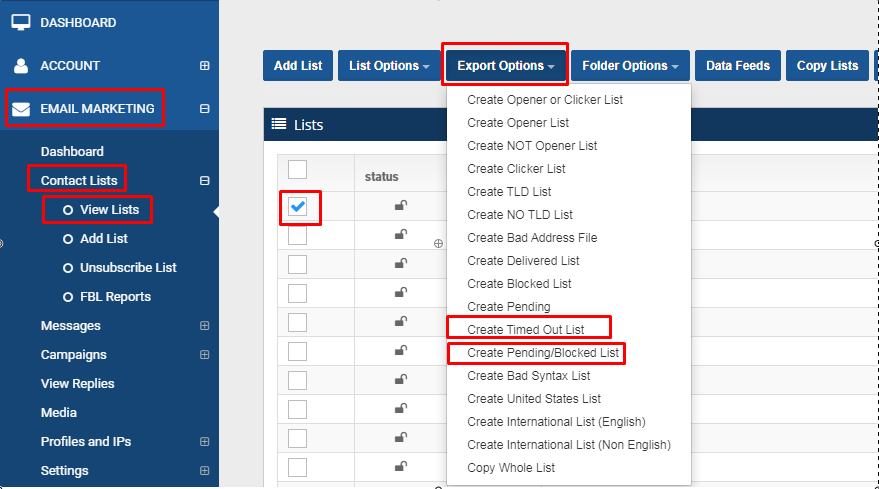
To generate/export blocked and timed out lists, just go to Email Marketing > Contact Lists > View List > check the email list of your choice > click Export Options > click Create Timed Out List or Create Pending/Blocked List

Not sure it'll hold up? We'll verify 10,000 records free and show you what's in your file.
Check my list →You don't have to be a customer. Most setups we diagnose run on Instantly, Klaviyo or Google Workspace.
Book a diagnosis →To generate/export blocked and timed out lists, just go to Email Marketing > Contact Lists > View List > check the email list of your choice > click Export Options > click Create Timed Out List or Create Pending/Blocked List
Watch the video tutorial below on how to add Email List. The first step in sending your email is to add an email list to your account. Click on the ‘Add List…
In some cases, you may experience getting some blocked and timed-out status in your campaign email list. This may depend on one factor which is your domain o…
Below is a list of status codes that your list can contain: Pending – emails that have not been sent yet. Delivered – valid email addresses that were accepte…
These columns are tracking columns that are used for email marketing campaigns. clickts – is the date/time that someone clicked a link clickip – is the IP ad…
Support is a person, weekdays 9am to 5pm CST — and the 30-minute deliverability diagnosis is free on any platform.